Sunday, January 9, 2022

Solana paper wallet to Phantom

Easiest way:

1) Create a new Phantom wallet, grab the pub key
2) In terminal, say you want to transfer 0.17 SOL `solana transfer SOL --allow-unfunded-recipient`, assuming the new phantom wallet has no funds


Thursday, February 20, 2014

Friday, December 27, 2013

OSX Mavericks 10.9 + OpenCV 2.4.7 + Eclipse Juno WITHOUT CUDA

Note to self, note to self, note to self

Setting up

1) Download OpenCV2.4.7
2) Extract the file
3) mkdir build inside the directory (where you extract openCV2.4.7 to)
4) cd build
5)

cmake -G "Unix Makefiles" -D CMAKE_CXX_COMPILER=/usr/bin/g++ -D CMAKE_C_COMPILER=/usr/bin/gcc -D CMAKE_CXX_FLAGS:STRING='-stdlib=libc++ -std=gnu++11' -D BUILD_PERF_TESTS=OFF -D BUILD_opencv_legacy=NO -D CMAKE_OSX_ARCHITECTURES=x86_64 -D WITH_CUDA=OFF  ..

6) make -j4
7) in Eclipse Juno, create a user library, Eclipse > Preferences > Java > Build Path > User Libraries > New > [Type OpenCV2.4.7] > Add External JARS
8) a) for jar file, browse to opencv-247.jar (usually in build/bin/opencv-247.jar)
8) b) also for native library location, browse to the lib directory (usually in build/lib)

Testing the linkage (in Eclipse Juno)

1) Create a new project
2) Link to OpenCV2.4.7 library by

Right Click your project > Properties > Add Library > User Library > Select OpenCV2.4.7

3) Create a class file with a main function > and duplicate the following codes
//opencvimport org.opencv.core.Core;
import org.opencv.core.CvType;
import org.opencv.core.Mat;
public class Tester {
/**
* @param args
*/
public static void main(String[] args) {
// TODO Auto-generated method stub
System.loadLibrary(Core.NATIVE_LIBRARY_NAME);
Mat mat = Mat.eye(3, 3, CvType.CV_8UC1);
System.out.println("mat= "+mat.dump());
}
}

4) Look at the *beaut* in the console now.

*DISCLAIMER*
Unfortunately, i am still figuring out to make this work with CUDA.  Until then .. until then..

Thursday, November 21, 2013

Mavericks OSX 10.9, HTTPS proxy, infinite loop of authentication boxes

If you are behind an obnoxious and thick-as-a-brick proxy, you will quickly find that an upgrade to 10.9 from 10.8 (or any earlier versions) will break your Safari, OSX software update, iTunes etc...

This is largely because of a semi-known bug with HTTPS proxy in KeyChain.   This blog post serves as a summary of what you can do in order to fix the problem (at least, let you get a decent OSX software update from App Store and see what happens there)

I have sorted the potential fixes in the order of likelihood to fix the problem.  For every fix, please open up Safari and see if the fix works(go to any of your favourite *internet* websites).  If yes, stop and go to Software Update.  If no, proceed with the next fix or leave me comments.

Fix #0

Before we proceed, you must make sure that you are comfortable with configuring proxy connections in OSX.  [System Preferences > Network > Network Interface > Advanced > Proxies]
Make sure, where necessary, you have your information input correctly in one or all of the followings:

  • Automatic Proxy Configuration
  • Web Proxy (HTTP)
  • Secure Proxy (HTTPS)
  • other proxies if applicable


Fix #1

As mentioned earlier, if you are like me that likes to dig in, search and look for the one thing that I want to see, you can actually go to [ Utilities > Console ] and you shall see the error messages that Mavericks complains every time it tries to look for the HTTPS key in the Key Chain

1) Open Utilities > KeyChain Access.app
2) In [login], you should see your proxy entries


3) Right click and select copy
4) In [system], if you see something similar, i suggest you remove those entries first (we will add them again in the next step)
5) In [system], right click and click paste (if it asks for your credentials, just enter your credentials and click ok)
6) Make sure one entry is for HTTP and one entry is for HTTPS and make sure the Account Name and Password are correct (you can check this by double clicking the entry)
7) For every one of the entries you just pasted, double click (enter credential if necessary) and go to Access Control
8) Select Allow all applications to access this item, click save changes and restart computer
9) Some applications might still ask you for permission to use the key in KeyChain, just say yes and enter the necessary credential

Fix #2

1) Open Utilities > Terminal.app > Type the following 2 commands.
sudo launchctl unload -w /System/Library/LaunchDaemons/com.apple.UserNotificationCenter.plist
sudo launchctl load - w /System/Library/LaunchDaemons/com.apple.UserNotificationCenter.plist
2) Restart computer

Fix #3
1) Open Utilities > Terminal.app
2) sudo vi /etc/hosts
3) make sure the ip address to your proxy is set there (ie. 192.168.0.1 proxy.abc.org) and press shift+: and type wq.
4) Restart computer


References
Just poke google with keywords like mavericks 10.9 https secure proxy safari app store


Friday, May 10, 2013

Watch Pronunciation

Audemars Piguet:OH-duh-MAHR PEA-GAY
A. Lange & Sohne:AH Lung-Geh Oohnt Sew-neh
Baume & Mercier:bohm AY mer-SEE-AY
Bedat:bid-UT
Breitling:brEYE-tling
Bulgari:bull-gar-EE
Carl F. Bucherer:Carl F BOOK-er-er
Cartier:Car-TEA-AY
Chanel:Shan-el
Chopard:Show-Par
Concord:Con-cord
Corum:Core-oom
Cvstos:COUS-toss
De Witt:Dah-Wit
Dior:DEE-oar
Ebel:AY-bell
Franck Muller:Fronk MEW-ler
Girard-Perregaux:Jee-rar Pear-ago
Hublot:OOH-blow
IWC:EYE-DOUBLE-YOU-SEE
Jaeger-LeCoultre:YAY-ger Le-Cool-ter
Movado:Moe-vah-doh
Oris:Oris
Panerai:Pun-a-rye
Parmigiani:Par-mi-GEE-ah-NEE
Patek Philippe:Pah-tek Fee-LEAP
Philippe Charriol:Fee-LEAP Shar-ee-ole
Piaget:PEE-ah-JAY
Raymond Weil:Ray-mand WHILE
Richard Mille:REE-Shar MEAL
Rolex:Row-Lex
TAG Heuer:Tahg Hoy-er
Ulysse Nardin:YOU-lis Nur-den
Vacheron Constantin:Va-sher-own Cone-Stun-tuhn
Zenith:ZEE-nith

Reference: http://www.gemnation.com/base?processor=getPage&pageName=watch-pronunciation

Monday, April 22, 2013

Unit Axes of a Cube


UnitAxes = ...
    [1 1 -1;...
    1 1 0; ...
    1 1 1; ...
    0 1 1; ...
    -1 1 1; ...
    -1 1 0; ...
    -1 1 -1; ...
    0 1 -1; ...
    
    1 0 -1;...
    1 0 0; ...
    1 0 1; ...
    0 0 1; ...
    -1 0 1; ...
    -1 0 0; ...
    -1 0 -1; ...
    0 0 -1; ...
    
    1 -1 -1;...
    1 -1 0; ...
    1 -1 1; ...
    0 -1 1; ...
    -1 -1 1; ...
    -1 -1 0; ...
    -1 -1 -1; ...
    0 -1 -1; ...
    
    0 1 0;...
    0 -1 0];
    

Thursday, September 13, 2012

Rotating 3D Figures in Octave

When Octave.app is executed, input the followings
> close all 
> setenv ("GNUTERM", "x11") 

There you go.

I'm sharing this original post from http://octave.1599824.n4.nabble.com/rotate-3d-graphics-td1638659.html

Delaunay Triangulation and a Plane

When reconstructing a surface especially in three dimensional, its almost inevitable that you need to generate planes based on a set of vertices. In the case, when the facets are unknown, we basically have a cloud of three dimensional points. Based on the cloud of points, our eyes may be able to tell us what the sillouette or the contour of the three dimensional model in question is; however it is quite difficult or this is not trivial and it is a well-studied problem in computational geometry.

Certainly, there are a lot of recently proposed and well-developed methodologies for estimating or reconstructing a surface based on a given cloud of points. This post is written just to provide an idea of one of the basics: delaunay triangulation.  In short delaunay triangulation is to create a triangular mesh for a set of vertices that meets the Delaunay conditions(the main idea is to prevent any surface-within-a-surface).

In matlab, it is fair easy to follow the example (provided by Matlab).  Or if you want to explore further, you can try to make a cube. Basically you just need to write down the vertices and let Matlab do its job. I will leave the readers to do this on your own.

X, Y, Z are the column vectors of a cube(meaning all the x coords, y coords and z coords, say you have 2 vertices (0,0,0) and (0,0,1), X=[0 0]; Y=[0 0]; Z=[0 1];).

> dt = delaunay(X,Y,Z); 
> trimesh(dt,X,Y,Z); 

Now, that's pretty straightforward. However, if you have a problem similar to mine, when you only want to create a 3D plane with delaunay(you have your own reasons, i don't have to tell you mine). In the above example, if you only specify one of the faces of the cube, Matlab will probably tell you that they cannot proceed because all vertices are on a plane or are co-linear.

In order to do so, you need to trick Matlab into thinking the plane is no longer a plane; basically you just have to 'extrapolate' the plane in the perpendicular direction

Originally 
X =[0 1 1 0];
Y =[0 1 1 0];
Z =[0 0 1 1];

Perturbed 
X =[ 0 1 1.01 1.01 1 0];
Y =[0 1 0.99 0.99 1 0];
Z =[0 0 0 1 1 1];

Running the same command in the previous section should give you the following rendering.

Tuesday, July 31, 2012

(Medical) Imaging / PACS / DICOM / Health Informatics Conferences

Month-view of conference submission deadlines (on-going update)
HI HIC AMIA, HAC APAMI BHI
MI CARS MICCAI, MIUA CINC HAMLYN SPIE(MI), SIPAIM ISBI, RSNA ECR
CV ICIP ICCV ICPR, ECCV,
IPCV
BMVC, CAIP ACCV, SIBGRAPI ESR, ICPRAM CVPR
Jan Feb Mar Apr May Jun Jul Aug Sep Oct Nov Dec

NEW JOURNAL ALERT:
Journal of Medical Imaging (SPIE) (http://spie.org/x102992.xml)


Journal  Field IF
JACC: Cardiovas Img MI 5.528
Circulation: Cardiovas Img MI 4.757
Med Img Analysis MI 3.681
IEEE T Med Img MI 3.799
J American Med Inf. Asso. MI 3.609
IEEE T Img Pro CV 3.111
Int J Cardiovas Img CV 2.539
Int J Med Inf HI 2.414
J of Dig Img MI/CV/HI 1.421
IEEE T Pattern Anal CV 4.908
Pattern Recogn CV 2.292
J Mach Learn Res CV 2.561
Ultrasound in Med & Bio MI/CV 2.455
Ann Biomed Eng MI/CV 2.575
IEEE T BIOMED ENG MI 2.575
COMPUTERIZED MEDICAL IMAGING AND GRAPHICS MI 1.664
Int J Cars MI MI 1.364
EUR J ECHOCARDIOGR MI 2.394
SIAM J Imaging Sci MI 2.867
EUR HEART J Cardiac Imaging MI 3.669


HI      Health Informatics
MI     Medical Images, Radiography, DICOM, PACS
CV    Computer Vision, Pattern Recognition, Machine Learning


TO DO:
- add more
- Attach links
- submission type
- other details


last updated (2014-10-07)

Wednesday, July 11, 2012

From Microsoft Word to Latex

As much as I want to work on my papers in Microsoft Word, its been proven minutes by minutes that working on an academic research paper is not feasible without the use of LaTex.  Here, in this article, from a 'noob's perspective, I will lay down some of the fundamentals that you will need in order to have  your latex environment setup, ready, runnin' & gunnin'.  Since i am writing a paper for an upcoming SPIE conference, i'll take SPIE style class as a reference. (http://kmh-lanl.hansonhub.com/spie/)


Assuming you have been working on papers using the followings:
1) Microsoft Word
2) Endnote

At the end of this article, you will be dropping the above two, and will then be using the followings extensively hereafter.
1) Miktex (Think of this as a Compiler/Interpreter)
2) TeXnicCenter (Think of this as an IDE)
3) JabRef (Think of this as a Reference Manager)


I) Download and Install


Download and Install the followings (All of the followings will be done with a 'default' installation) Note: The version numbers are as of writing.

  • Miktex 2.9 (http://miktex.org/2.9/setup)
  • TeXnicCenter 1 RC 1 Installer (http://www.texniccenter.org/resources/downloads/29)
  • JabRef 2.8.1 (http://jabref.sourceforge.net/)
Download from "HansonHub" (see above) and save them in a folder
  • spie.cls
  • spiebib.bst
  • ifthen.sty
  • cite.sty
  • article.tex
  • report.bib
  • mcr3b.eps

II) Setup Search Path for Miktex
  1. Start > All Programs > MikTex 2.9 > Maintenance > Settings > Roots [tab]
  2. Add the path, in my case, i added the path to "My Documents"\[Papers]\[Conference_Name]\[Year]\tex\latex\"
  3. Go back to General [tab]
  4. Click Refresh FNDB

III) Get TeXnicCenter going

When you first load TeXnicCenter, it will ask you for the root path to all your tex-related executables, in my case, i specified "C:\Program Files\miktex\miktex\bin".  It will then fill in the blanks for Yap and the rest.  

4) Start writing with the SPIE format

1) Open up article.tex (you can rename this to a more sensible filename)
2) Then, click on Project > Create with active file as main file
3) Press Ctrl F7, and then Press Ctrl F5, you shall see the LaTex with SPIE format 
(if you have any errors in the output window, post it up here as comments) You can also try refreshing FNDB, to see if some of the errors are resolved.

IV) EndNote to Bibtex

ENDNOTE first
  1. Open up Endnote
  2. Click on Edit > Output Styles > select "BibTex Export" or go to Style Manager, and enable "BibTex Export" Click Apply/OK
  3. While you are still in Endnote, select all your citations, Click on File > Export  > In the output style selection list, choose BibTex Export
  4. Give it a sensible file name (it has to be in .txt, you will need to rename to .bib as you as its done saving)
  5. Save it to the folder along with your article.tex in step 3

JabRef Now
  1. Open up JabRef
  2. Open the .bib file you created and renamed in the previous step
  3. It will prompt errors saying none of the citations has BibTex Key
  4. You will need to auto-generate, while you are in JabRef, press Ctrl-G, and you will see your BibtexKey columns being filled
  5. Save the .bib
V) Completing the Circle

  1. Go back to TeXnicCenter
  2. Scroll to the bottom where you should see \bibliography{report}
  3. Change it to the .bib you saved in the previous step but without .bib (at this step, i suggest you refresh FNDB, again)
  4. Press Ctrl F7, and then Press Ctrl F5, you shall see the LaTex with SPIE format (if you have any errors in the output window, post it up here as comments) You can also try refreshing FNDB, to see if some of the errors are resolved.   You might also want to try to give a testing citation or two, just add \cite{ONE_OF_YOUR_BIBTEX_KEY} in any of the paragraphs reasonably. 

This should be it !


Thursday, October 6, 2011

Matlab: SURF, creating a surface.

I have no problems admitting that i am not a smart person at all.  When it comes to programming/mathematics/image processing/medical imaging analysis, every day, i make sure i tell myself i am a  real novice and there are boundless rooms for me to improve.

Just like one of Matlab's function: SURF/SURFACE.  The function creates a surface based on a matrix or columns(x,y, and/or z).  Reading Matlab's help on surf bewildered me further.   My intention was simple.  I wanted to create a surface, but i didn't have a z function and my z was not anyhow defined by x and y.  If my z is well defined, i might as well have a pretty good model for what i am trying to do.

Anyway, imagine that you just want to create a square plane.  How do you do it with surf ?

After fiddling with this and that, reading this and that, i finally realized what needs to be understood.

Say, i want to create a 2 x 2 plane flattened on z = 2 using coordinates.
As unintelligent as this might look, i could actually go by doing the followings:

> x = [-1  1; -1 1];
> y = [-1 -1;  1 1];
> z = [ 2  2;  2 2];
> surf(x,y,z); 

For a smart person like you, you should already recognize the that there are 4 x-y-z points (-1 -1 2), (1 -1 2), (-1 1 2), and (1 1 2). Note that even you know z is 2 across the whole plane. You cannot just input 2. You need a MxN matrix (which happens to be the M and N of X or Y), which makes sense other wise, Matlab won't know how to reconstruct that plane. In the above case, it will be a 2 x 2 matrix. This might seem introductory to you. But it gives me a better understanding of making a surface in matlab.

Thursday, September 1, 2011

What should be disposed in your Flex Codes? (possible flex memory leaks)

According to the well-written article here, there are several possible scenarios which would lead to memory leaks.

1) You started a timer but forgot to destroy it (remove)
2) You created an event listener, but forgot to destroy it (remove)
3) You created loader objects, but forgot to destroy it (remove)
4) You created variables (references), but forgot to destroy it (null, empty array)
5) You created an annoymous handler, and you cannot destroy it ( #sigh )


The Flow for making JPIP streaming possible from a DCM4CHEE (manually)

This documents my way to get the DCMs to output to a JPIP Stream

You will need:

1) A remote archive( preferably, if not try local) DICOM archive (supports dicom queries)
2) DCM4CHEE (unzipped)
3) Kakadu JPIP Server and Client (you can sub this in with others)
4) DCMTK

Pseudo-Steps:

1) Retrieve Images from a remote archive


a) set up a dcmrcv
> dcmrcv AE_TITLE@11112 -dest H:\Folder


b) cmove from a remote archive to dcmrcv
> dcmqr -L AE_TITLE@LOCALMACHINE AE_TITLE@REMOTEMACHINE:PORT -cmove AE_TITLE -qPatientID=1234567 -cstoredest /tmp


2) Convert 'cmove'ed images to a kakadu encoder-compatible format

a) this step is a bit important if your remote archive tends to store everything to a jpeg-ls or jpeg lossless format with different process tables).  Step a) is to ensure it will be converted to explicit big endian (which dcmtk knows what it is.
>DCM4CHEE\DCM2DCM "H:\Folder\abc.dcm" "H:\Folder\convertedabc.dcm" 

b) Convert to PGM with DCMTK
> DCMTK\DCMP2PGM "H:\Folder\convertedabc.dcm" "H:\Folder\convertedabc.pgm"

c) Convert to JP2 with Kakadu
> Kakadu\kdu_compress -i "H:\Folder\convertedabc.dcm" -o "H:\Folder\convertedabc.jp2" -rate 1.0


3) Start JPIP Server

*assuming you have moved convertedabc.jp2 to a place where the server knows where to read from
> kdu_server -address localhost -port 8080

4) Start JPIP Client
Just make sure your JPIP Url is correct and the target file is convertedabc.jp2 (in this example).


There, that'd do it.  If not, email me or leave me a comment for me to analyze your situation.  Thanks!!


Security Issues of Web Apps


Your web app is likely to be constantly under attack!  
Just take a look at the following list!


Common Concerns
Secure Messaging
Protection of Resources
Negotiation of Contracts
Trust Management


Common Attacks against Web Services
Reconnaissance Attacks
Dictionary Attack
Forceful Browsing Attack
Directory Traversal Attack
WSDL Scanning
Sniffing
Privilege Escalation Attempts
Format String Attacks
Exploiting Unprotected Administrator Interfaces

Attacks on Confidentiality
Registry Disclosure Attacks

Attacks on Integrity
Parameter Tampering
Coercive Parsing
Schema Poisoning
Spoofing of UDDI/ebXML messages
Principal Spoofing
Routing Detours
External Entity Attack
Cannoicalization
Intelligent Tamparing
Impersonation

DOS attacks
Flooding attacks
Recursive Payloads sent to XML Parsers
Buffer overflow exploits
Race Conditions
Symlink Attacks
Memory Leak Exploitation
Command Injection
SQL Injection
XML injection

Malicious Code Attacks

URL String Attacks
Parameter Tampering
Cross-site Scripting
Session Hijacking
Malformed Content
Logic Bombs Trapdoors/Backdoors


Reference:
Sangwan S. and Sangwan YS. (2010)  "Designing a Frame Work for Web Application Information Security Architecture".  International Journal of Electronics Engineering 2(2):337-380

Wednesday, August 31, 2011

DICOM Transfer Syntax UID

1.2.840.10008 is reserved for DICOM Transfer Syntaxes

Below is the set of UIDs for a number of  Transfer Syntaxes

Implicit VR Little Endian
1.2.840.10008.1.2
Explicit VR Little Endian Transfer Syntax
1.2.840.10008.1.2.1
Explicit VR Big Endian Transfer Syntax
1.2.840.10008.1.2.2
RLE Compression
1.2.840.10008.1.2.5
Deflated Explicit VR Little Endian
1.2.840.10008.1.2.1.99
JPEG Baseline
(JPEG Coding Process 1)
1.2.840.10008.1.2.4.50
JPEG Extended
 (JPEG Coding Process 2)(8-bit)
(JPEG Coding Process 4)(12-bit)
1.2.840.10008.1.2.4.51
JPEG(lossless, non-hierarchical) (JPEG Coding Process 14)
1.2.840.10008.1.2.4.57
JPEG (lossless, non-hierarchical, first-order prediction) (JPEG Coding Process 14)
1.2.840.10008.1.2.4.70
JPEG-LS  (Lossless Mode)
1.2.840.10008.1.2.4.80
JPEG-LS (Near Lossless Mode)
1.2.840.10008.1.2.4.81
JPEG 2000 Part 1(Lossless)
1.2.840.10008.1.2.4.90
JPEG 2000 Part 1(Lossless or Lossy)
1.2.840.10008.1.2.4.91
JPEG 2000 Part 2(Lossless)
1.2.840.10008.1.2.4.92
JPEG 2000 Part 2(Lossless or Lossy)
1.2.840.10008.1.2.4.93
JPIP
1.2.840.10008.1.2.4.94
JPIP (Referenced Deflate)
1.2.840.10008.1.2.4.95
MPEG2 MP@ML
1.2.840.10008.1.2.4.100
MEPG2 MP@HL
1.2.840.10008.1.2.4.101
MPEG4 AVC/H.264
1.2.840.10008.1.2.4.102
MPEG4 AVC/H.264 BD
1.2.840.10008.1.2.4.103


I have put together a table like this for my future reference.

Sunday, August 28, 2011

Deploying Flex Apps to iOS Devices

This entry documents what i did to deploy my flex apps to iOS Devices.

Pre-requisites:
A.1) Flash Builder 4.5(preferably with Flex SDK 4.5.1)
A.2) Air 2.6+
A.3) A registered Apple Developer's Account

You will then need:
B.1) A certificate from your Developer's Account (in iOS Provisioning Portal > Certificates)
* if your certificate has expired, you will then need to revoke your certificate, and renew all provisioning profiles*
B.2) A provisioning profile (in iOS Provisioning Portal > Provisioning)


Steps to build and deploy Flex Apps to iOS Devices
1) New Flex Mobile Project (check those that are needed, check iOS of course).
2)
a) to run in simulator, you just have to select 'On Desktop'
b) to run in device, you will need to select 'On Device' (and then select the appropriate packaging method)
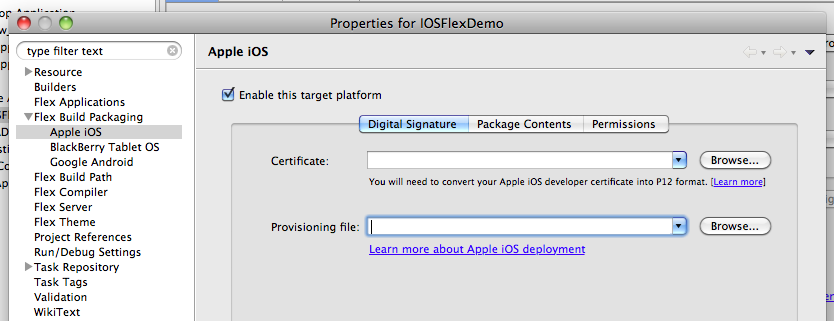
If you intend to run in the device, you will need to configure the package settings. 

Where it says "Certificate", input what you derive from B.1.  Where it says Provisioning File, input what you derive from B.2.

3) Click Apply and click Run.
4) You will the be prompted to enter the password that has been paired up with your certificate.

5) After that, it will start packaging and it can take several or a very, very long time (if you select the Standard Packaging Method).
6) It will then tell you that it has packaged to an output directory.

7) Right click on the   .ipa   file and open in iTunes
8) Note that if you have a copy of the app in your iOS device, make sure you have it uninstalled
9) in the App tab of your device in iTunes, make sure your app is checked and then sync the device
10)  Run your app in your iOS Device and DONE!


Tuesday, August 16, 2011

HIGH FIBRE DIET

Everyone of us, as it is recommended, needs to intake 30g of fibres every single day.
Here is a list i dup-ed.  Meat and eggs do not have fibers.

HIGH FIBER FOODS LIST with TOTAL FIBER GRAMS (g)

 Fresh & Dried Fruit Serving SizeFiber (g)
 Apples with skin 1 medium5.0
 Apricot 3 medium1.0
 Apricots, dried 4 pieces2.9
 Banana 1 medium3.9
 Blueberries 1 cup4.2
 Cantaloupe, cubes 1 cup1.3
 Figs, dried 2 medium3.7
 Grapefruit 1/2 medium3.1
 Orange, navel 1 medium3.4
 Peach 1 medium2.0
 Peaches, dried 3 pieces3.2
 Pear 1 medium5.1
 Plum 1 medium1.1
 Raisins 1.5 oz box1.6
 Raspberries 1 cup6.4
 Strawberries 1 cup4.4

 Grains, Beans, Nuts & Seeds Serving SizeFiber (g)
 Almonds 1 oz4.2
 Black beans, cooked 1 cup13.9
 Bran cereal 1 cup19.9
 Bread, whole wheat 1 slice2.0
 Brown rice, dry 1 cup7.9
 Cashews 1 oz1.0
 Flax seeds 3 Tbsp.6.9
 Garbanzo beans, cooked 1 cup5.8
 Kidney beans, cooked 1 cup11.6
 Lentils, red cooked 1 cup13.6
 Lima beans, cooked 1 cup8.6
 Oats, rolled dry 1 cup12.0
 Quinoa (seeds) dry 1/4 cup6.2
 Quinoa, cooked 1 cup8.4
 Pasta, whole wheat 1 cup6.3
 Peanuts 1 oz2.3
 Pistachio nuts 1 oz3.1
 Pumpkin seeds 1/4 cup4.1
 Soybeans, cooked 1 cup8.6
 Sunflower seeds 1/4 cup3.0
 Walnuts 1 oz3.1

 Vegetables Serving SizeFiber (g)
 Avocado (fruit) 1 medium11.8
 Beets, cooked 1 cup2.8
 Beet greens 1 cup4.2
 Bok choy, cooked 1 cup2.8
 Broccoli, cooked 1 cup4.5
 Brussels sprouts, cooked 1 cup3.6
 Cabbage, cooked 1 cup4.2
 Carrot 1 medium2.6
 Carrot, cooked 1 cup5.2
 Cauliflower, cooked 1 cup3.4
 Cole slaw 1 cup4.0
 Collard greens, cooked 1 cup2.6
 Corn, sweet 1 cup4.6
 Green beans 1 cup4.0
 Celery 1 stalk1.1
 Kale, cooked 1 cup7.2
 Onions, raw 1 cup2.9
 Peas, cooked 1 cup8.8
 Peppers, sweet 1 cup2.6
 Pop corn, air-popped 3 cups3.6
 Potato, baked w/ skin 1 medium4.8
 Spinach, cooked 1 cup4.3
 Summer squash, cooked 1 cup2.5
 Sweet potato, cooked 1 medium4.9
 Swiss chard, cooked 1 cup3.7
 Tomato 1 medium1.0
 Winter squash, cooked 1 cup6.2
 Zucchini, cooked 1 cup2.6

Almost all of the foods i dislike have good amount of fibres.  
Basically, more veggie, and some more fruits and some more beans!  Less meat and egg.

In hk, theres a list of prepackaged snacks compiled by HKNA
http://www.hkna.org.hk/en/Snack_DB_2011_Food_Items_EN_21.2.2011.pdf