According to the well-written article here, there are several possible scenarios which would lead to memory leaks.
1) You started a timer but forgot to destroy it (remove)
2) You created an event listener, but forgot to destroy it (remove)
3) You created loader objects, but forgot to destroy it (remove)
4) You created variables (references), but forgot to destroy it (null, empty array)
5) You created an annoymous handler, and you cannot destroy it ( #sigh )
Showing posts with label flex. Show all posts
Showing posts with label flex. Show all posts
Thursday, September 1, 2011

Sunday, August 28, 2011
Deploying Flex Apps to iOS Devices
This entry documents what i did to deploy my flex apps to iOS Devices.
Pre-requisites:
A.1) Flash Builder 4.5(preferably with Flex SDK 4.5.1)
A.2) Air 2.6+
A.3) A registered Apple Developer's Account
You will then need:
B.1) A certificate from your Developer's Account (in iOS Provisioning Portal > Certificates)
* if your certificate has expired, you will then need to revoke your certificate, and renew all provisioning profiles*
B.2) A provisioning profile (in iOS Provisioning Portal > Provisioning)
Steps to build and deploy Flex Apps to iOS Devices
1) New Flex Mobile Project (check those that are needed, check iOS of course).
2)
a) to run in simulator, you just have to select 'On Desktop'
b) to run in device, you will need to select 'On Device' (and then select the appropriate packaging method)


Where it says "Certificate", input what you derive from B.1. Where it says Provisioning File, input what you derive from B.2.
3) Click Apply and click Run.
4) You will the be prompted to enter the password that has been paired up with your certificate.

5) After that, it will start packaging and it can take several or a very, very long time (if you select the Standard Packaging Method).
6) It will then tell you that it has packaged to an output directory.

7) Right click on the .ipa file and open in iTunes
8) Note that if you have a copy of the app in your iOS device, make sure you have it uninstalled
9) in the App tab of your device in iTunes, make sure your app is checked and then sync the device
10) Run your app in your iOS Device and DONE!
Pre-requisites:
A.1) Flash Builder 4.5(preferably with Flex SDK 4.5.1)
A.2) Air 2.6+
A.3) A registered Apple Developer's Account
You will then need:
B.1) A certificate from your Developer's Account (in iOS Provisioning Portal > Certificates)
* if your certificate has expired, you will then need to revoke your certificate, and renew all provisioning profiles*
B.2) A provisioning profile (in iOS Provisioning Portal > Provisioning)
Steps to build and deploy Flex Apps to iOS Devices
1) New Flex Mobile Project (check those that are needed, check iOS of course).
2)
a) to run in simulator, you just have to select 'On Desktop'
b) to run in device, you will need to select 'On Device' (and then select the appropriate packaging method)

If you intend to run in the device, you will need to configure the package settings.
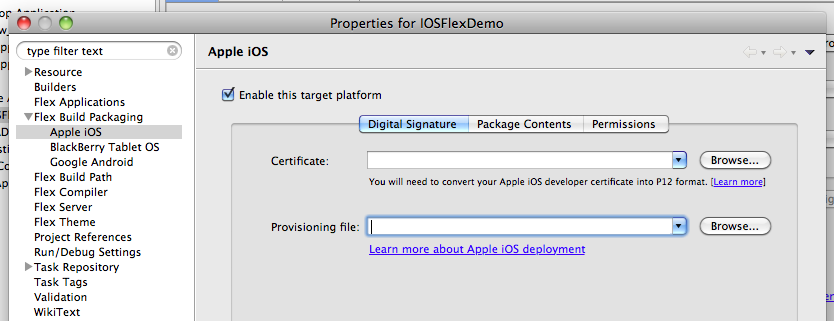
3) Click Apply and click Run.
4) You will the be prompted to enter the password that has been paired up with your certificate.

5) After that, it will start packaging and it can take several or a very, very long time (if you select the Standard Packaging Method).
6) It will then tell you that it has packaged to an output directory.

7) Right click on the .ipa file and open in iTunes
8) Note that if you have a copy of the app in your iOS device, make sure you have it uninstalled
9) in the App tab of your device in iTunes, make sure your app is checked and then sync the device
10) Run your app in your iOS Device and DONE!
Sunday, April 3, 2011
Flex + Camera Capture (Entry-Level)
Below please find the simplest set of codes for snapping what's been fed from your camera.
<s:application minheight="600" minwidth="955" xmlns:fx="http://ns.adobe.com/mxml/2009" xmlns:mx="library://ns.adobe.com/flex/mx" xmlns:s="library://ns.adobe.com/flex/spark">

<fx:script>


</fx:script>

<fx:declarations>


</fx:declarations>


<mx:videodisplay creationcomplete="videoDisplay_creationCompleteHandler(event)" height="320" id="videoDisplay" width="480" x="0" y="0" />

<mx:button click="snapshotBtn_clickHandler(event)" id="snapshotBtn" x="0" y="330"/>

<mx:image id="myImg" x="490" y="0"/>


</s:application>
Subscribe to:
Posts (Atom)