Showing posts with label ios. Show all posts

Sunday, August 28, 2011

Deploying Flex Apps to iOS Devices

This entry documents what i did to deploy my flex apps to iOS Devices.

Pre-requisites:
A.1) Flash Builder 4.5(preferably with Flex SDK 4.5.1)
A.2) Air 2.6+
A.3) A registered Apple Developer's Account

You will then need:
B.1) A certificate from your Developer's Account (in iOS Provisioning Portal > Certificates)
* if your certificate has expired, you will then need to revoke your certificate, and renew all provisioning profiles*
B.2) A provisioning profile (in iOS Provisioning Portal > Provisioning)


Steps to build and deploy Flex Apps to iOS Devices
1) New Flex Mobile Project (check those that are needed, check iOS of course).
2)
a) to run in simulator, you just have to select 'On Desktop'
b) to run in device, you will need to select 'On Device' (and then select the appropriate packaging method)
If you intend to run in the device, you will need to configure the package settings. 
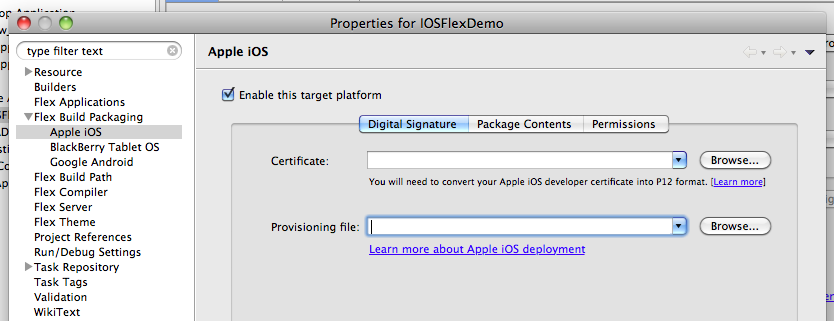
Where it says "Certificate", input what you derive from B.1.  Where it says Provisioning File, input what you derive from B.2.

3) Click Apply and click Run.
4) You will the be prompted to enter the password that has been paired up with your certificate.

5) After that, it will start packaging and it can take several or a very, very long time (if you select the Standard Packaging Method).
6) It will then tell you that it has packaged to an output directory.

7) Right click on the   .ipa   file and open in iTunes
8) Note that if you have a copy of the app in your iOS device, make sure you have it uninstalled
9) in the App tab of your device in iTunes, make sure your app is checked and then sync the device
10)  Run your app in your iOS Device and DONE!


Tuesday, April 19, 2011

Monday, April 18, 2011

Useful Links:
1) http://developer.apple.com/library/ios/#documentation/iphone/conceptual/iphoneosprogrammingguide/CoreApplication/CoreApplication.html

2) http://iosfeatures.blogspot.com/


Application life cycle


Table 2-3  Application states
State
Description
Not running
The application has not been launched or was running but was terminated by the system.
Inactive
The application is running in the foreground but is currently not receiving events. (It may be executing other code though.) An application usually stays in this state only briefly as it transitions to a different state. The only time it stays inactive for any period of time is when the user locks the screen or the system prompts the user to respond to some event, such as an incoming phone call or SMS message.
Active
The application is running in the foreground and is receiving events.
Background
The application is in the background and executing code. Most applications enter this state briefly on their way to being suspended. However, an application that requests extra execution time may remain in this state for a period of time. In addition, an application being launched directly into the background enters this state instead of the inactive state. For information about how to execute code while in the background, see “Executing Code in the Background.”
The background state is available only in iOS 4 and later and on devices that support multitasking. If this state is not available, applications are terminated and moved to the not-running state instead.
Suspended
The application is in the background but is not executing code. The system moves an application to this state automatically and at appropriate times. While suspended, an application is essentially freeze-dried in its current state and does not execute any code. During low-memory conditions, the system may purge suspended applications without notice to make more space for the foreground application.
The suspended state is available only in iOS 4 and later and on devices that support multitasking. If this state is not available, applications are terminated and moved to the not-running state instead.
To facilitate movement between these transitions, the system calls the following methods of your application delegate.
Figure 2-3  Launching into the active state


Figure 2-4  Moving from the foreground to the background

igure 2-5  Handling application interruptions (such as SMS, phone call etc..)

Figure 2-6  Transitioning from the background to the foreground